Keep up with the literature, one swipe at a time.
JClub reads the firehose — 103 journals and the preprint servers — and hands you the papers worth your attention: one card at a time, each with a four-part AI summary and a link to the source of record. Where your library is on LibKey, the full text is one tap away.

Free, and it works without an account. On Android? Get an email the day it lands.

This week on JClub
New citations, press coverage and Bluesky conversation, measured nightly across every paper JClub indexes — with the app’s AI summary on each.
Daraxonrasib significantly improves overall survival and progression-free survival in previously treated metastatic pancreatic ductal adenocarcinoma, with median overall survival of 13.2 months versus 6.6 months for chemotherapy.
- 12 cited this week
The 2026 AHA/ACC/ADA/ASN guideline updates and expands management strategies for cardiovascular-kidney-metabolic syndrome, targeting clinicians caring for affected patients.
- 9 cited this week
Perioperative ADT plus apalutamide improves pathological response and metastasis-free survival in high-risk prostate cancer patients undergoing prostatectomy, with 8.9% achieving complete response.
- 7 cited this week
Biomni, a versatile AI agent, autonomously performs diverse biomedical research tasks with high accuracy across 25 domains, accelerating discovery processes.
- 6 cited this week
Over 59% of pancreatic cancer patients treated with daraxonrasib develop resistance through RAS pathway alterations, including KRAS amplification and RTK upregulation.
- 3 cited this week
- Open access
Built for the minutes between experiments.
Keeping up is rarely a reading block you schedule. It’s a few minutes between the bench and the next meeting, working out whether anything published since you last looked is worth opening. JClub is built for that session, not for a seated hour.

From firehose to feed in four steps.
Choose your journals
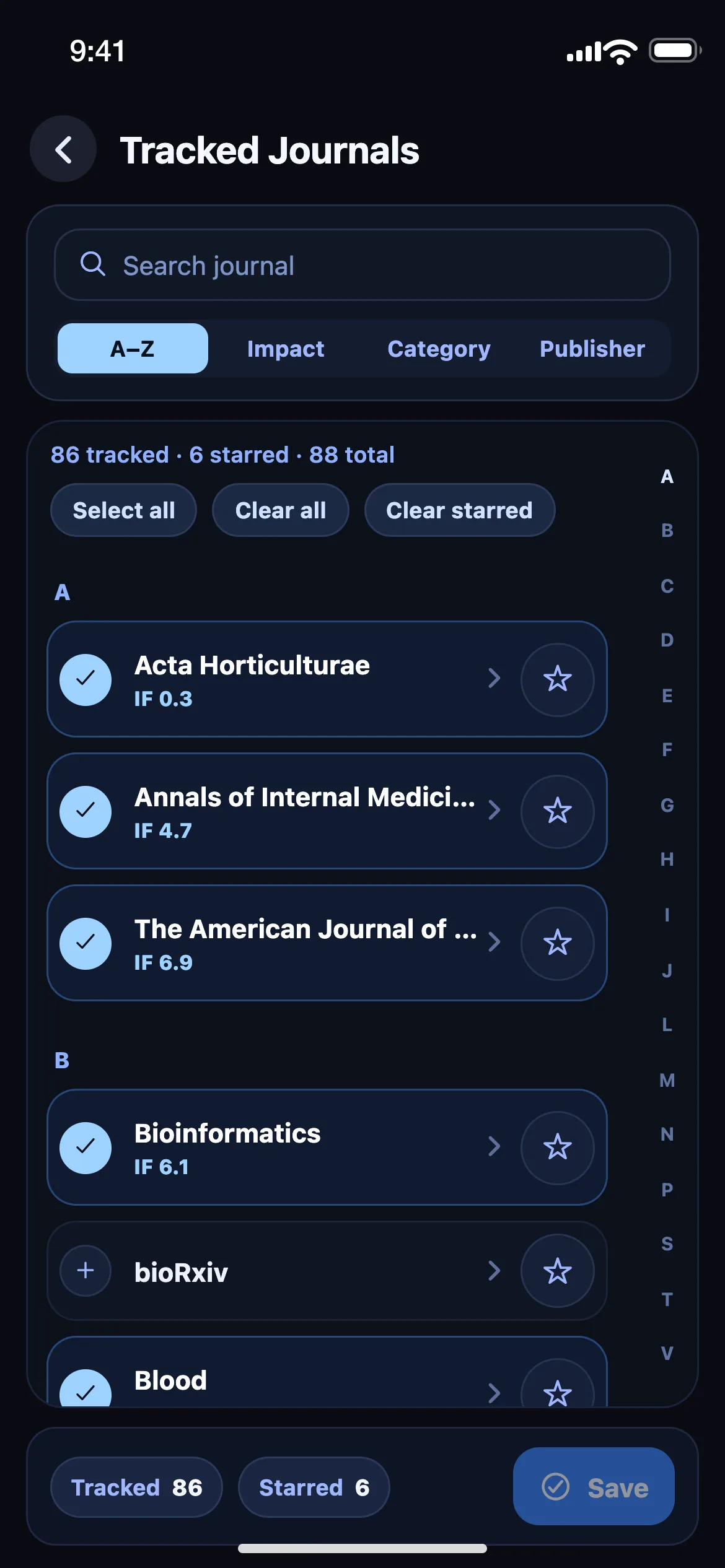
Pick from 103 titles across 10 fields — or start with three interests and let the ranking work from those.
Swipe through what’s new
The newest papers arrive as focused cards, one at a time. Swipe up when you’re done — the deck remembers where you left off.
Read the way you want
Lead with the four-part AI summary, read the abstract where its licence allows, or open the full text — through your own library where it holds the paper. Every card links to the source of record.
Let the signals find you
Follow authors and papers, set alert keywords, and get a push when a new paper cites your work.
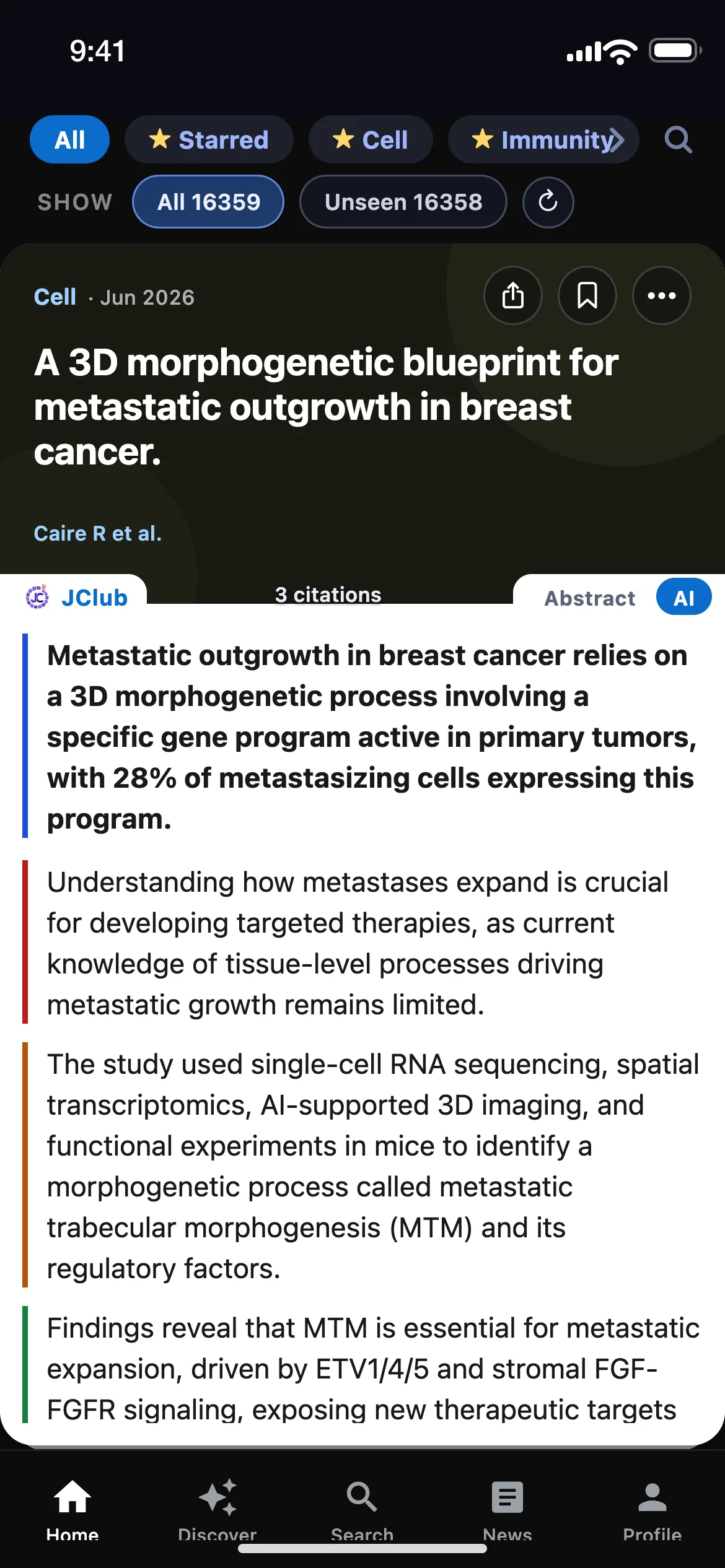
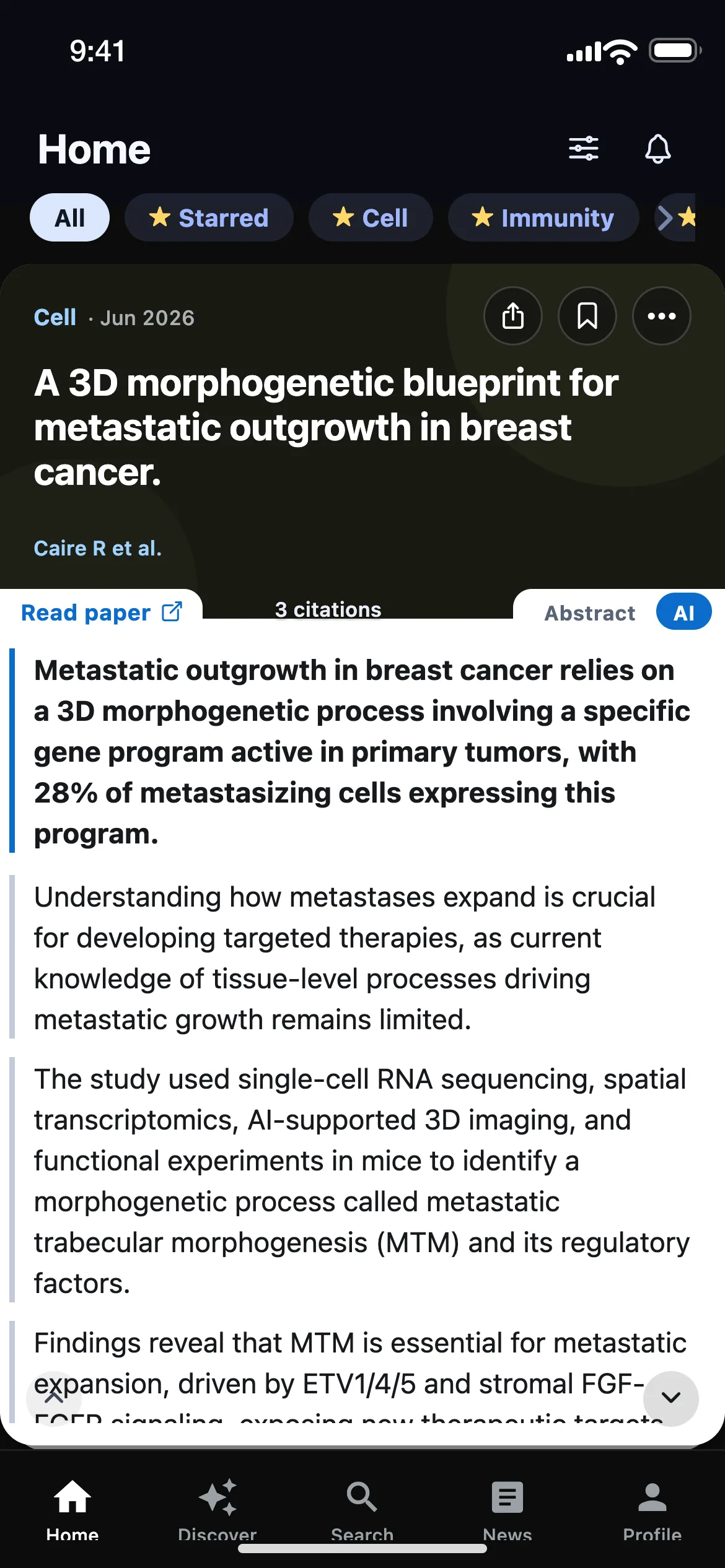
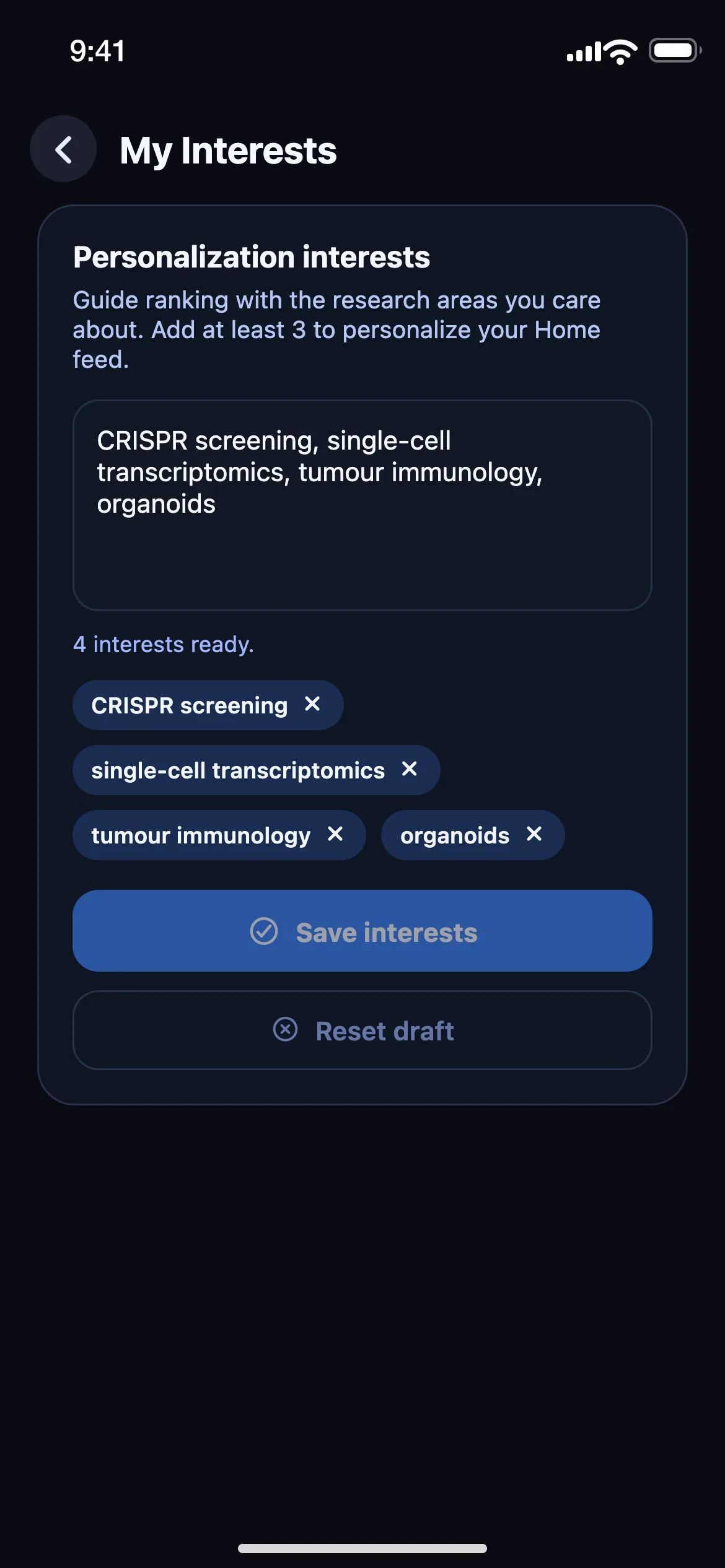
A feed that reads the way you do.
One paper at a time
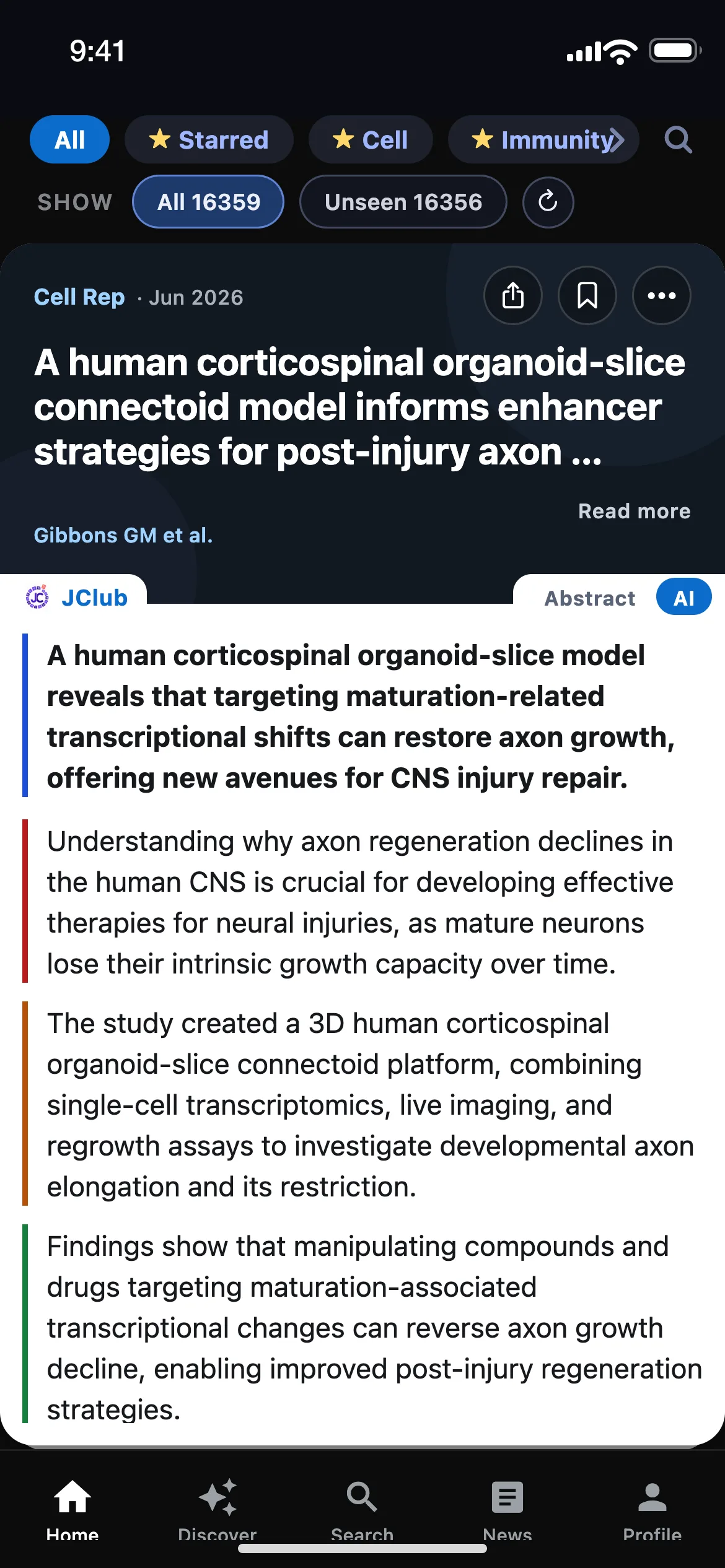
No infinite scroll, no wall of tabs. Each new paper is a single card — swipe up when you’re done, and the deck remembers exactly where you left off.
Summaries you can scan in seconds
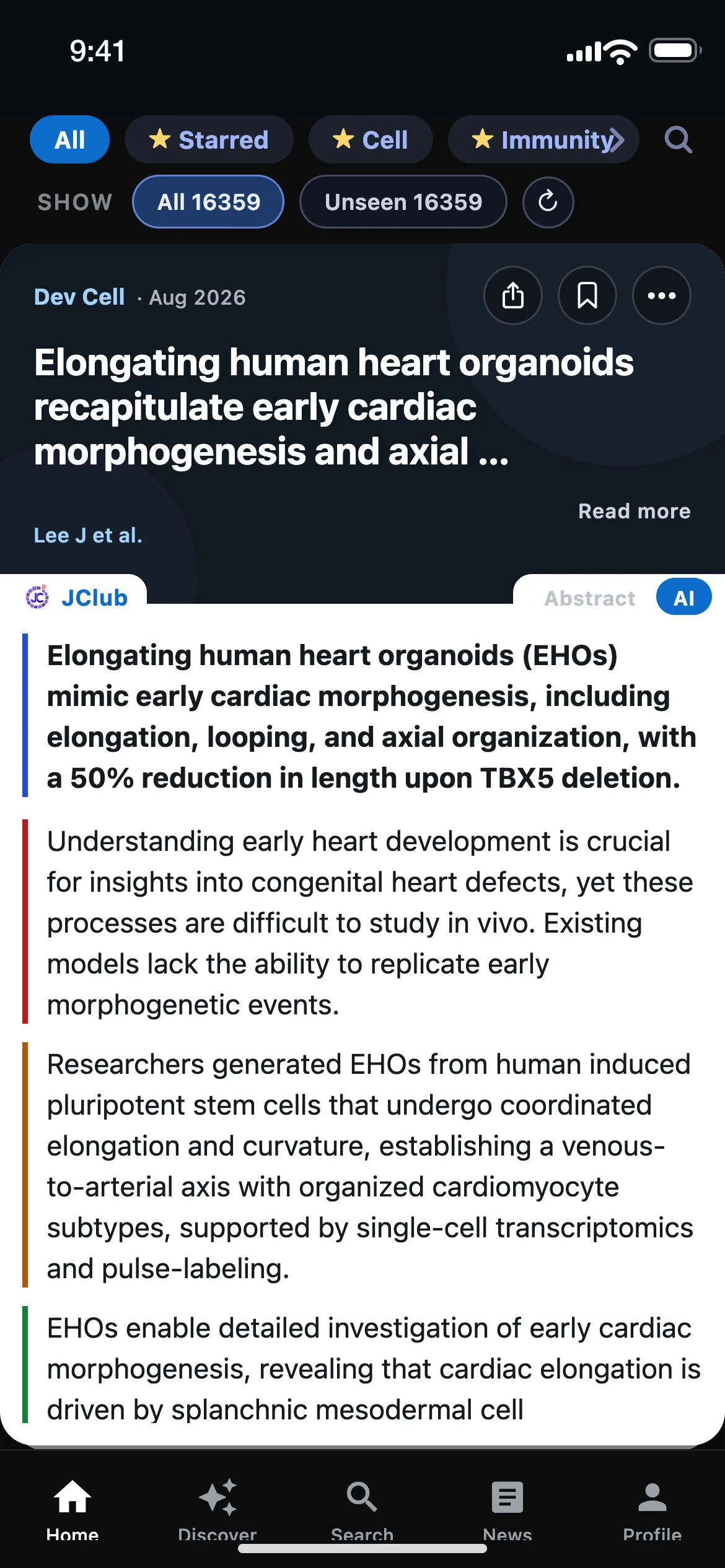
Every paper with an abstract opens with a four-part AI summary: the finding, why it matters, what they did, and the result — the headline marked in blue, the rest in reading order. The paper itself is one tap away — and the abstract too, where its licence allows.
AlphaFold predicts a protein's 3D structure from its sequence alone with near-experimental accuracy — a median backbone error of about 1 Å across the CASP14 blind assessment.
- Solving one protein structure experimentally can take years, so most known protein sequences have never had a structure.
- The team trained a neural network on known structures and evolutionary information, then submitted blind predictions to the CASP14 assessment.
- Predictions were competitive with experimental structures for most targets — accurate enough to power structural biology at proteome scale.
Alerts with a reason
Every notification answers three questions at a glance: which paper, why you, why now. Citations to your work lead; keyword matches, followed authors and papers, and your digest follow — every kind is laid out in Tuned to you below.
Every control, in plain sight.
JClub personalises on three things you set yourself — the interests you name, the papers you’ve published, and the journals and people you follow. Here they are, with the controls around them, drawn the way they look in the app.
Ranked by what you publish, not just what you tap
Home is ranked inside the journals you track by the interests you name and, once you’ve connected ORCID, by your own publication record. Signed in, it also learns quietly from what you save, open and skip. One switch decides the balance.
Personalize Home by
Choose what shapes your Home feed. Publications only apply once you’ve connected your author profile.
Papers that match you always come before the rest, whichever mode you pick.
Interests rank. Keywords filter.
Name three or more interests and they shape Home, the Discover rails, News for you, search shortcuts and your digest — matched on topics, not just the literal word. Keyword filters are the strict cousin: only papers containing that exact term, DOI or trial ID reach the deck.
Each interest is matched on topics — see the ones moving this week →
Every alert says which paper, why you, why now
Up to five alert keywords are checked against every new title and abstract — real-time, hourly or daily. Add citation alerts for your own papers and for any paper you follow, a push when a followed author publishes, and a note if a saved paper is retracted or a preprint you follow is published. Usually within a few hours of a paper appearing online.
One push a week with the papers that matched you
The weekly digest leads with any new citations to your work — otherwise with your top interest — then your strongest match, its one-line finding and journal, with the rest a tap away. It holds one to five papers and skips a week rather than pad one. A daily digest is there if you want it.
Get a daily summary of new papers.
Get a weekly summary of top papers.
Follow journals, authors, papers — and your institution
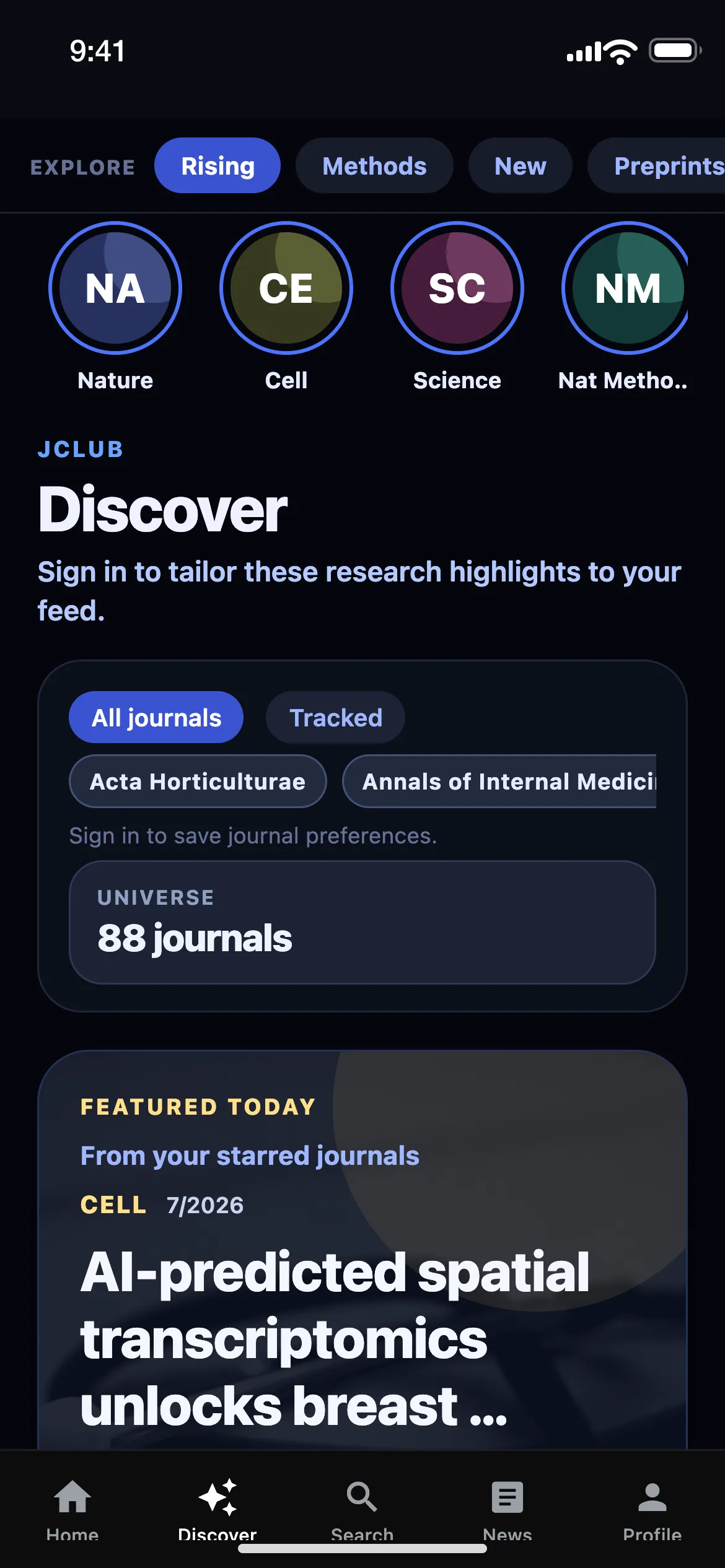
Star a journal and its newest papers become stories at the top of Discover. Follow an author for a rail of their newest work and a push when they publish — for profiles JClub can verify. Follow a paper to be told when it’s cited. Claim your institution for its newest papers in Discover.
Reading, the way you want it
Prefer papers with abstracts? One switch hides the rest. Motion is optional, so is the summary highlighting, and the daily science brief is one switch — on iOS it may start as a quiet trial you can turn off. No permission dialog at launch, only when you switch something on. Library access has its own switch once you’ve claimed your institution — where your library is on LibKey, JClub checks the holding before it promises full text — with an advanced field for a custom proxy.
App
Turn this off to keep abstract-missing articles out of the feed.
Disable swipe animations in the feed.
Mark the summary’s headline with a blue rail. Also toggleable on each card.
One notification each morning with the day’s biggest science stories. Works signed out.
Library access
Your library is on LibKey: JClub checks whether your library has each article, so a “Full text” label means it’s really there. You sign in on your library’s own page — JClub never sees your password.
Defaults shown — on iOS the science brief may start as a quiet trial; the switches here are a preview.
News, grants, meetings and jobs — each with a reason
A one-paragraph morning read on the day’s biggest science stories, research news with our own brief and a link out, funding calls sorted by what closes next, meetings soonest-first by region, and research jobs with closing dates up front. Every For You rail says why: “Because you follow …”.
An editorial layer over your fields.
Home is what’s new in the journals you track, ranked for you. Discover is what that feed would miss — one question per rail, named in the title.
Methods
Technique-heavy papers worth scanning when you need a methods refresh.
See these 8 papers
- Interactive Tree of Life (iTOL) v6: recent updates to the phylogenetic tree display and annotation tool — Nucleic Acids Res, 4/2024, Ivica Letunic et al. · 4,796 cites
- A new framework for developing and evaluating complex interventions: update of Medical Research Council guidance — BMJ, 9/2021, Kathryn Skivington et al. · 4,611 cites
- TRIPOD+AI statement: updated guidance for reporting clinical prediction models that use regression or machine learning methods — BMJ, 4/2024, Gary S Collins et al. · 3,723 cites
- YaHS: yet another Hi-C scaffolding tool — Bioinformatics, 12/2022, Chenxi Zhou et al. · 2,528 cites
- MetaboAnalyst 6.0: towards a unified platform for metabolomics data processing, analysis and interpretation — Nucleic Acids Res, 4/2024, Zhiqiang Pang et al. · 2,353 cites
- TimeTree 5: An Expanded Resource for Species Divergence Times — Mol Biol Evol, 8/2022, Sudhir Kumar et al. · 1,552 cites
- Methods and applications for single-cell and spatial multi-omics — Nat Rev Genet, 3/2023, Katy Vandereyken et al. · 1,223 cites
- A Python library for probabilistic analysis of single-cell omics data — Nat Biotechnol, 2/2022, Adam Gayoso et al. · 847 cites
High impact
Papers punching above field average by normalized citation impact (FWCI).
See these 8 papers
- DeepSeek-R1 incentivizes reasoning in LLMs through reinforcement learning — Nature, 9/2025, Daya Guo et al. · 1,166 cites
- Phase 3 Trial of Semaglutide in Metabolic Dysfunction–Associated Steatohepatitis — NEJM, 6/2025, Arun J. Sanyal et al. · 1,021 cites
- Tirzepatide as Compared with Semaglutide for the Treatment of Obesity — NEJM, 7/2025, Louis J. Aronne et al. · 585 cites
- Global burden of 292 causes of death in 204 countries and territories and 660 subnational locations, 1990–2023: a systematic analysis for the Global Burden of Disease Study 2023 — Lancet, 10/2025, Mohsen Naghavi et al. · 510 cites
- NF-κB in inflammation and cancer — Cell Mol Immunol, 6/2025, Hongmei Mao et al. · 493 cites
- The intestinal barrier: a pivotal role in health, inflammation, and cancer — Lancet Gastroenterol Hepatol, 6/2025, Markus F Neurath et al. · 481 cites
- The EAT–Lancet Commission on healthy, sustainable, and just food systems — Lancet, 10/2025, Johan Rockström et al. · 466 cites
- Homogenized chlorine distribution for >27% power conversion efficiency in perovskite solar cells — Science, 11/2025, Zhuang Xiong et al. · 451 cites
Foundational
Long-horizon papers that still define the conversation. Filter by 1, 5, 10, or 20 years.
See these 8 papers
- Global burden of 292 causes of death in 204 countries and territories and 660 subnational locations, 1990–2023: a systematic analysis for the Global Burden of Disease Study 2023 — Lancet, 10/2025, Mohsen Naghavi et al. · 510 cites
- The EAT–Lancet Commission on healthy, sustainable, and just food systems — Lancet, 10/2025, Johan Rockström et al. · 466 cites
- Homogenized chlorine distribution for >27% power conversion efficiency in perovskite solar cells — Science, 11/2025, Zhuang Xiong et al. · 451 cites
- Advancing regulatory variant effect prediction with AlphaGenome — Nature, 1/2026, Žiga Avsec et al. · 319 cites
- Endoscopist deskilling risk after exposure to artificial intelligence in colonoscopy: a multicentre, observational study — Lancet Gastroenterol Hepatol, 10/2025, Krzysztof Budzyń et al. · 277 cites
- Transparent Reporting of Observational Studies Emulating a Target Trial—The TARGET Statement — JAMA, 9/2025, Aidan G. Cashin et al. · 240 cites
- Hallmarks of cancer—Then and now, and beyond — Cell, 4/2026, Douglas Hanahan · 227 cites
- 2026 Heart Disease and Stroke Statistics: A Report of US and Global Data From the American Heart Association — Circulation, 3/2026, Latha P. Palaniappan et al. · 212 cites
See these 8 papers
- Accurate structure prediction of biomolecular interactions with AlphaFold 3 — Nature, 5/2024, Josh Abramson et al. · 16,653 cites
- Global burden of bacterial antimicrobial resistance in 2019: a systematic analysis — Lancet, 2/2022, Christopher J L Murray et al. · 14,518 cites
- The STRING database in 2023: protein–protein association networks and functional enrichment analyses for any sequenced genome of interest — Nucleic Acids Res, 11/2022, Damian Szklarczyk et al. · 9,639 cites
- ColabFold: making protein folding accessible to all — Nat Methods, 5/2022, Milot Mirdita et al. · 9,455 cites
- Hallmarks of Cancer: New Dimensions — Cancer Discov, 1/2022, Douglas Hanahan · 9,158 cites
- AlphaFold Protein Structure Database: massively expanding the structural coverage of protein-sequence space with high-accuracy models — Nucleic Acids Res, 11/2021, Mihaly Varadi et al. · 8,089 cites
- Hallmarks of aging: An expanding universe — Cell, 1/2023, Carlos López-Otín et al. · 6,442 cites
- Evolutionary-scale prediction of atomic-level protein structure with a language model — Science, 3/2023, Zeming Lin et al. · 5,759 cites
See these 8 papers
- The PRISMA 2020 statement: an updated guideline for reporting systematic reviews — BMJ, 3/2021, Matthew J Page et al. · 90,698 cites
- Highly accurate protein structure prediction with AlphaFold — Nature, 7/2021, John Jumper et al. · 45,068 cites
- SciPy 1.0: fundamental algorithms for scientific computing in Python — Nat Methods, 2/2020, Pauli Virtanen et al. · 38,146 cites
- PRISMA Extension for Scoping Reviews (PRISMA-ScR): Checklist and Explanation — Ann Intern Med, 10/2018, Andrea C. Tricco et al. · 38,115 cites
- Clinical features of patients infected with 2019 novel coronavirus in Wuhan, China — Lancet, 2/2020, Chaolin Huang et al. · 36,729 cites
- MEGA X: Molecular Evolutionary Genetics Analysis across Computing Platforms — Mol Biol Evol, 5/2018, Sudhir Kumar et al. · 34,133 cites
- fastp: an ultra-fast all-in-one FASTQ preprocessor — Bioinformatics, 9/2018, Shifu Chen et al. · 28,870 cites
- RoB 2: a revised tool for assessing risk of bias in randomised trials — BMJ, 8/2019, Jonathan A C Sterne et al. · 26,861 cites
See these 8 papers
- Moderated estimation of fold change and dispersion for RNA-seq data with DESeq2 — Genome Biol, 12/2014, Michael I Love et al. · 90,778 cites
- The PRISMA 2020 statement: an updated guideline for reporting systematic reviews — BMJ, 3/2021, Matthew J Page et al. · 90,698 cites
- Fiji: an open-source platform for biological-image analysis — Nat Methods, 6/2012, Johannes Schindelin et al. · 68,231 cites
- Trimmomatic: a flexible trimmer for Illumina sequence data — Bioinformatics, 4/2014, Anthony M. Bolger et al. · 63,081 cites
- NIH Image to ImageJ: 25 years of image analysis — Nat Methods, 6/2012, Caroline A Schneider et al. · 61,504 cites
- The Sequence Alignment/Map format and SAMtools — Bioinformatics, 6/2009, Heng Li et al. · 60,211 cites
- Hallmarks of Cancer: The Next Generation — Cell, 3/2011, Douglas Hanahan et al. · 57,337 cites
- Highly accurate protein structure prediction with AlphaFold — Nature, 7/2021, John Jumper et al. · 45,068 cites
A one-year window has few true classics, so the app tops it up from High impact, Rising and New — this list does the same.
Every rail in the app
- For you
- Papers matched to what you read and publish. (signed in)
- In your interests
- One rail per interest: the newest papers in it from the last 30–180 days.
- New from authors you follow
- The latest work from researchers you follow.
- From your institution
- The newest papers affiliated with your institution.
- Starred journals
- Fresh and high-signal picks from journals you starred.
- Rising
- Fast-moving papers gaining unusually strong recent attention.
- Methods
- Technique-heavy papers worth scanning when you need a methods refresh. — shown above
- New
- The newest additions, biased toward recency rather than signal.
- Preprints
- Early signals from bioRxiv and medRxiv before formal publication.
- Open access
- Open papers you can read immediately without leaving the thread cold.
- High impact
- Papers punching above field average by normalized citation impact (FWCI). — shown above
- Foundational
- Long-horizon papers that still define the conversation. Filter by 1, 5, 10, or 20 years. — shown above
On this page the rails glide so you can see more of them. In the app you scroll each rail yourself and page it ten cards at a time.
Real papers from the app’s Discover rails, a snapshot taken 20 September 2026 · citation counts via Crossref · field percentiles via OpenAlex · titles link to doi.org. In the app the rails refresh hourly and rotate daily.
 Works with LibKey
Full text from your library, one tap away.
Claim your institution once. Where your library is on LibKey — most Australian universities and around 1,800 libraries worldwide — JClub asks your library before it promises anything, so when a card says Full text, it’s really there.
- Checked, not guessed. Every paper is checked against your library’s own holdings before you tap. No landing on a paywall you were told was open.
- Your library’s sign-in, never ours. You sign in on your library’s own page. JClub never sees your password and never handles your credentials.
- Not on LibKey? No worries. Claim your institution anyway and tell us with one tap — we set up your library’s own access route for you.

LibKey is a trademark of Third Iron LLC.
Save it in JClub. Cite it from Zotero or Mendeley.
Connect Zotero or Mendeley once, and every paper you save lands in a “JClub” collection or folder in your own library — ready in your reference manager when you sit down to write. Nothing to export, nothing to remember.
- Add-only, by design. JClub only ever adds papers — it never edits or deletes anything in your library.
- Metadata, nothing else. Titles, authors, journals and identifiers — never PDFs, never your reading activity.
- Lists and tags stay in JClub. Your saved papers keep their lists and tags in the app — and if you use another reference manager, a one-tap BibTeX export of your whole library covers it.
- Yours to revoke. Disconnect in Settings and JClub’s copy of your credentials is deleted on our side — for Zotero we also ask it to revoke the key, so you can verify it’s gone on your own Zotero keys page.
Zotero is a registered trademark of the Corporation for Digital Scholarship; Mendeley is a trademark of Elsevier. JClub is an independent app and is not affiliated with or endorsed by either.
Everything else a researcher actually needs.
Search your whole corpus
One search across every paper JClub tracks — journals, preprints, and research news — ranked by relevance and recency.
The journals that matter to your field.
JClub tracks 103 journals across 10 fields and both preprint servers. Every journal has its own page — in the app, the list is My Journals.
Built value-first, private by default.
Guest-first
Everything works without an account. Your choices stay on your device until you decide to sign in.
No data sales, no tracking
No data brokers, no tracking across apps, no third-party ad SDKs. Sponsored items, where they appear, are clearly labelled, sold by us directly, and never influence your ranking — advertisers get no data about you.
Source of record
Every card links to the publisher or repository of record. AI summaries assist — they never replace the paper.
Fair questions, straight answers.
Which devices can I use JClub on?
Do I need an account to use JClub?
What data does JClub store about me?
Do you sell my data or run ads?
How accurate are the AI summaries?
Will I get the full text of papers?
Does JClub work with Zotero or Mendeley?
Do you show the full paper abstract?
Is connecting my ORCID required?
What’s the difference between interests, keyword filters and alert keywords?
What is Discover, and are the papers on this page real?
How quickly do alerts arrive?
Which notifications are on by default, and do any come by email?
Can I delete my account and data?
More detail in the privacy policy.
Be reading in one swipe.
JClub is free on the App Store, and you can start reading without an account.

On Android? The app is with Google for review. Leave your email and we'll tell you the day it goes live.